1 min read
The Most Important Microsoft AI Product Announcements This Year
This year, Microsoft made AI the centerpiece of nearly every product update in its portfolio. From Copilot evolving into something far more...
5 min read
Jordan Hetrick
:
June 24, 2026
Microsoft now ships AI tools that range from an assistant inside your Word documents to a full enterprise cloud development platform. This post maps out what each one does, where each one fits, and how Phoenix businesses can decide where to start.
Microsoft does not sell a single product called "AI." What it offers is a layered collection of Microsoft AI tools spanning its cloud platform, productivity suite, and business applications. The three areas Phoenix businesses will encounter most often are Azure AI (the developer- and enterprise-grade cloud layer), Microsoft 365 Copilot (the AI woven into Office apps), and the broader Power Platform and Dynamics 365 ecosystem for operations and automation.
Each layer has a different entry point, a different cost structure, and a different type of business problem it solves best.
Azure is Microsoft's cloud platform, offering the most technically deep component of Microsoft’s AI offerings. Azure AI is a suite of AI frameworks, services, and tools built on Microsoft's Azure cloud computing platform, enabling business owners and developers to create AI agents using cloud computing and machine learning.
For Phoenix businesses that want to build something custom, Azure is the place to start. Azure provides ready-to-use AI services for natural language processing, computer vision, and speech recognition, and also supports custom AI development through Azure Machine Learning, where businesses can train and deploy AI models tailored to their specific needs. Through the Azure OpenAI Service, organizations can bring ChatGPT and other advanced models directly into production workloads.
Microsoft recently (June 2026) introduced Azure AI Foundry as a unified platform to accelerate AI adoption across businesses, integrating with familiar tools such as GitHub, Visual Studio, and Copilot Studio. Key features include the Azure AI Foundry SDK, which unifies AI tools within a single ecosystem, and the evolved Azure AI Studio, now functioning as an enterprise-grade AI management portal.
For businesses without dedicated development teams, Azure also offers a no-code path. Azure AI Studio includes a visual interface for building AI agents, with no programming experience required, and users can access prebuilt algorithms for training AI systems via Azure Machine Learning.
Phoenix industries with large volumes of specialized data, such as healthcare, finance, or logistics, experience the most utility from Azure AI, since the platform allows organizations to train models on their proprietary data rather than relying entirely on general-purpose AI.
Unlike Azure AI, which requires some technical setup, Microsoft 365 Copilot is designed for employees who are not interested in machine learning but still want AI to handle daily tedious tasks. It lives inside Outlook, Teams, Word, Excel, and PowerPoint.
A 2025 Forrester study found that Microsoft 365 Copilot users save an average of 9 hours per month on tasks such as email drafting, meeting summaries, and report generation. That figure compounds quickly for organizations with large teams. Across a team of ten people, nine saved hours per person per month adds up to roughly 90 hours returned to higher-value work.
The productivity numbers go beyond time savings. More than 60% of Fortune 500 companies adopted Microsoft Copilot by early 2024, with 77% of all enterprise users reporting a definite increase in productivity. Organizations also saw a 10-15% increase in overall productivity levels and a 19% reduction in employee burnout.
Copilot in Teams can generate meeting summaries and automatically pull out action items. Copilot in Word can draft a first version of a proposal from an outline. Copilot in Excel can analyze data and surface trends without requiring the user to build formulas manually. Financial modeling in Excel with Copilot has been reported to be 30-40% faster in enterprise pilot programs, while document drafting in Word has been reported to be 50-60% faster in corporate rollouts.
One important note for businesses evaluating the cost: Microsoft 365 Copilot is not included in standard Microsoft 365 subscriptions and requires a separate add-on license. The actual return on that investment depends heavily on whether employees get proper onboarding and whether the implementation connects Copilot to the workflows where the team actually spends its time.
The Power Platform is an option between the enterprise complexity of Azure and the user-friendly simplicity of Copilot. It offers a collection of low-code tools that let non-technical employees build workflows, analyze data, and automate repetitive tasks.
Microsoft's Power Platform:
The four main components are:
Power Automate is evolving with smarter automation tools, including generative AI actions, intelligent document processing, and new human-in-the-loop experiences such as advanced approvals, as well as stronger governance and security controls to manage automation at scale.
For a mid-sized Phoenix company that receives hundreds of vendor invoices each month, Power Automate can extract invoice data automatically and route it for approval, with no custom code required. A retail business could use Power BI to pull sales data from multiple locations into a single live dashboard. A property management company could use Copilot Studio to build a tenant-facing chatbot that answers common questions around the clock.
Dynamics 365 is Microsoft's ERP and CRM platform, and it has become one of the most AI-dense parts of the Microsoft ecosystem over the last year. Microsoft was named a Leader in three Gartner Magic Quadrant reports for Cloud ERP and was also recognized as a Leader in the IDC MarketScape as part of the Worldwide AI-Enabled Large Enterprise ERP Applications 2025 Vendor Assessment.
The AI capabilities in Dynamics 365 are built directly into operational workflows, rather than existing as a separate layer on top of them. Across Dynamics 365 Finance and Operations, embedded agents are transforming core processes, from time and expense entry in Project Operations to supplier outreach in Supply Chain Management to reconciliations in Finance and technician scheduling in Field Service.
For local Phoenix businesses in the construction, real estate, or manufacturing sectors, this is particularly relevant. AI-powered customer service in Dynamics 365 enables organizations to scale personalized support without increasing operational overhead, embedding AI-driven chatbots and Copilot experiences into customer workflows to improve response times and reduce service costs.
Sales teams benefit as well. The Sales Qualification Agent in Dynamics 365 uses AI to automatically search for and rank new leads, giving sales teams a list of promising prospects, contact suggestions, and ready-to-send follow-up emails, reducing time spent researching unqualified leads.
Phoenix businesses operating in regulated industries such as healthcare, legal, or finance will want to understand where Microsoft stands on data governance and compliance before deploying any of these tools.
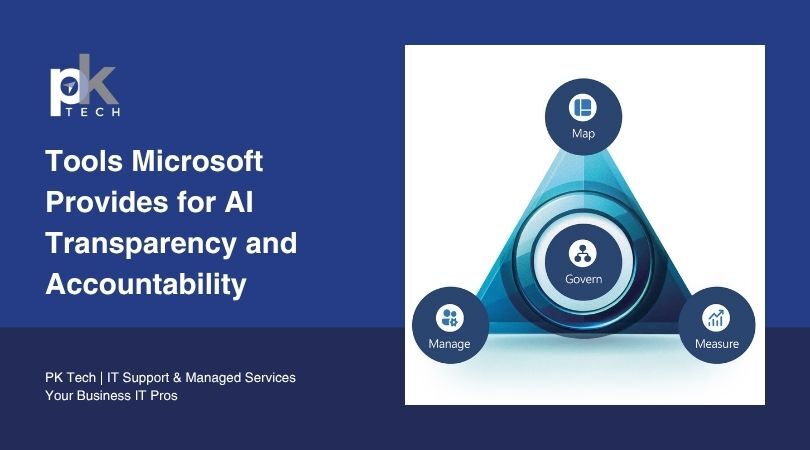
Microsoft has pledged to comply with all relevant laws, including the EU AI Act. It continues to invest in AI governance, actively building AI products and services that help customers deploy AI responsibly and compliantly. Azure AI also includes dedicated tools for detecting model bias, ensuring output transparency, and controlling which data the AI can access.
For IT and digital transformation leaders, Azure equips enterprises to connect AI models to critical data sources, applications, and workflows, integrating generative AI while maintaining security and governance standards.
Phoenix businesses benefit from both a compliance and trust standpoint. Employees are more likely to adopt AI tools when they understand what the system can and cannot see, and when leadership can answer basic questions about where business data goes.
The right entry point depends on what problem you're trying to solve. If your team already runs Microsoft 365, Copilot is the fastest path to tangible time savings with minimal technical overhead.
If you have repetitive processes that span multiple systems, Power Automate is worth evaluating before investing in anything more complex.
If you're building a product, running a customer-facing application, or managing large volumes of proprietary data, Azure AI gives you the most flexibility and control.
Dynamics 365 makes the most sense if you're either already using it and want to activate its AI features, or if you're in the market for a new ERP or CRM and want AI baked into the core of how you manage customers, inventory, and finance.
Microsoft has invested heavily in making these tools work together. By integrating Azure AI Foundry with GitHub, Visual Studio, and Copilot Studio, Microsoft has created a connected ecosystem where tools share context and organizations can move from experimentation to enterprise-wide deployment more efficiently.
For Phoenix businesses, this matters because the tools share context. You can start with Copilot, add Power Automate later, and connect to Azure without rebuilding from scratch.
The biggest variable is whether your team has a clear problem to solve and the training to use the tools. Without both, the investment does not return much.
Is your business ready to explore AI solutions?
At PK Tech, we have over 16 years of experience supporting businesses like yours. We maintain AICPA's SOC 2 Type II attestation, verified through an independent third-party audit of our security and privacy controls. As a Microsoft Partner, we can help your business build a setup that is both effective and cost-efficient. Schedule a call with our team here.
1 min read
This year, Microsoft made AI the centerpiece of nearly every product update in its portfolio. From Copilot evolving into something far more...

1 min read
Microsoft has built a set of tools designed to make AI systems more transparent, more auditable, and less likely to cause harm. But behind those...
1 min read
Microsoft Copilot has moved well past the pilot stage. More than 60% of Fortune 500 companies had already adopted the tool by early 2024, and...