3 min read

What is Microsoft Co-Pilot, and Should I Be Using It?

What is Microsoft Co-Pilot, and Should I Be Using It?

Artificial intelligence is no longer a distant future concept. The integration of AI is rapidly becoming an integral part of everyday work. One of the most prominent players in this shift is Microsoft Copilot, an AI assistant integrated into Microsoft’s ecosystem to help users work faster, smarter, and with less friction. 

But what exactly is Copilot?


What does your business get by default, and what requires an upgrade?


And, the most important question: should your business be using it? 


This blog breaks down what’s included, what’s not, and how to evaluate whether Copilot is right for your organization.

What Is Microsoft Copilot?

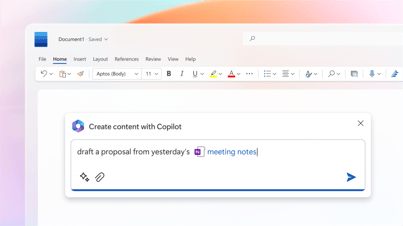
Press-Image_FINAL_16x9-4Microsoft Copilot is Microsoft’s AI-powered productivity assistant designed to help users write, summarize, analyze, automate, and search across Microsoft 365 tools. It functions like an advanced AI companion built directly into Windows, Microsoft 365 apps, and other Microsoft services.

But here’s where many businesses get confused: Not all Copilots are the same. Microsoft uses the “Copilot” name broadly, encompassing both free, built-in features and paid, enterprise-grade AI tools.

HOT TIP 🔥: Many business owners don’t realize that Microsoft essentially provides their employees with a type of “Chat GPT” for free. In our humble opinion, as business owners ourselves, we’d rather have our employees use the free version of Microsoft Co-Pilot rather than the free or paid version of ChatGPT. 

Then, if you’re ready for an upgrade, use the paid version of Microsoft Co-Pilot.

Ok, but back to the original question: how can you know which version of Co-Pilot you’re using, or which one you might need? 

What’s Built In: Free Copilot Features

Even without a paid license, many businesses already have access to basic Copilot functionality. These free or built-in features include:

1. Windows Copilot (Now Integrated as Copilot in Windows)


Available on most modern Windows 11 devices, this version of Copilot can:

  • Answer questions and provide general AI assistance
  • Change system settings
  • Generate text and summarize content
  • Provide basic help inside Windows apps

Limitations: It is similar to a general-purpose chatbot; useful, but not deeply integrated into business data.

2. Edge Copilot (Browser-Based)


Built into the Microsoft Edge browser, this Copilot can:

  • Summarize webpages
  • Assist with drafting emails or posts
  • Create images using built-in generative AI
  • Help search the web more efficiently

Limitations: Again, helpful (yes), but not connected to your company’s internal files.

3. Limited Copilot Features in Microsoft Apps


Some light AI enhancements are available in:

  • Outlook for spell-check and smart suggestions
  • Microsoft Teams for meeting recaps (limited without the paid version)
  • PowerPoint for suggested slide designs

Limitations: These features are helpful but don’t enable full automation or business-level data insights.

What’s Not Built In: Paid Copilot for Microsoft 365

To unlock the powerful, business-altering features most people associate with Copilot, you need a paid enterprise license such as Copilot for Microsoft 365.

This upgraded version can:

1. Access and Analyze Your Business Data


Paid Copilot connects securely to your:

  • Outlook email and calendars
  • SharePoint and OneDrive documents
  • Teams chat history
  • Microsoft 365 apps and workflows

It can draft documents using your company’s tone, summarize large sets of emails, and answer questions based on your internal data. These are all capabilities the free version does not provide.

2. Enhance Productivity Inside Microsoft Apps


Paid Copilot enables deep, task-level assistance like:

  • Drafting and rewriting documents in Word
  • Building presentations with branded designs in PowerPoint
  • Turning raw data into insights and dashboards in Excel
  • Generating Teams meeting recaps with spoken content, action items, and follow-up tasks

These are the tools that truly move the productivity needle for businesses.

3. Provide Enterprise Security and Compliance


With a paid license, Copilot:

  • Respects data permissions
  • Keeps sensitive information secure
  • Follows Microsoft’s enterprise compliance standards

Free versions do not manage or control organizational data.

Should Your Business Be Using Microsoft Copilot?

The answer depends on your business goals, workflows, and data security needs. 

Our general answer is “yes”. Given the choice between Copilot and other chat functions, Copilot wins the argument for most organizations.

Copilot May Be Right for Your Business If:

  • Your team spends hours writing emails, preparing proposals, or creating presentations
  • Employees struggle to find information across Microsoft 365
  • You want to automate repetitive tasks
  • You already rely heavily on Microsoft 365 tools
  • You’re looking to increase efficiency without hiring additional staff

Copilot May Not Be Necessary If:

  • Your team uses Microsoft apps lightly
  • You don’t store critical data in Microsoft 365
  • Your workflows are simple and don’t require automation
  • You want basic AI assistance but don’t need internal data integration


HERO-image-M365Copilot_HeroBanner_WordApp_Prompt_1920x1080-1024x576Think of it this way:


The free Copilot is a smart helper.

The paid Copilot is a digital employee.


Copilot Is Powerful, But Know What You’re Getting

Microsoft Copilot is transforming how businesses work, but understanding the difference between what’s built in and what requires a paid upgrade is crucial. Free versions give you a capable general-purpose AI assistant, but only the paid Copilot for Microsoft 365 integrates with your business data, workflows, and security needs.

Still, as IT experts focused on small business support, we recommend Copilot over other competitive chat functions, such as ChatGPT. 

If your organization relies on Microsoft 365 and wants to level up productivity, paid Copilot may be a strategic investment. For lighter needs or early experimentation, the built-in Copilot features are a great starting point.

Questions about Microsoft Co-Pilot or any of the Microsoft 365 suite of applications? We are here to support! Schedule a time to chat with a member of our team. 

How to Use Microsoft 365 for the Healthcare Industry

How to Use Microsoft 365 for the Healthcare Industry

Microsoft 365 offers a wonderful (but sometimes overwhelming) world of features. Depending on your industry, there are countless ways to utilize it....

Read More
80 Million People Are Using Microsoft Teams Phone for VOIP. Are You?

80 Million People Are Using Microsoft Teams Phone for VOIP. Are You?

The new Microsoft Teams Phone features are giving business calling a modern makeover. Around 80 million people are currently using Microsoft Teams...

Read More
The 8 Best Features of Microsoft Teams Phone

The 8 Best Features of Microsoft Teams Phone

When it comes to the vast array of Microsoft products, Microsoft Teams Phone is a lesser-known but highly useful Voice over IP (VoIP) software...

Read More